DentivaDentiva
Dentiva
FeaturesProductPricing
Solo Practice (1 Chair)Everyday care and admin for your own practice.Growing Clinic (2-4 Chairs)Keep doctors, chairs and your front desk aligned.Multi-Branch NetworkConnect your team across clinic locations.
Resources
BlogsIdeas for running a dental practice.Help ArticlesPractical walkthroughs for Dentiva.Clinic Setup GuideFrom your first plan to opening day.
LoginStart Free Trial
Start Free Trial

Your Clinic Website, with Online Booking

Show your clinic. Let patients choose a visit.

example-clinic.dentiva.in
ED

Example Dental Clinic

Our careOur teamVisit us

Your next visit starts here.

Meet our team. Explore our services. Find a visit time.

Choose a visit

Bengaluru

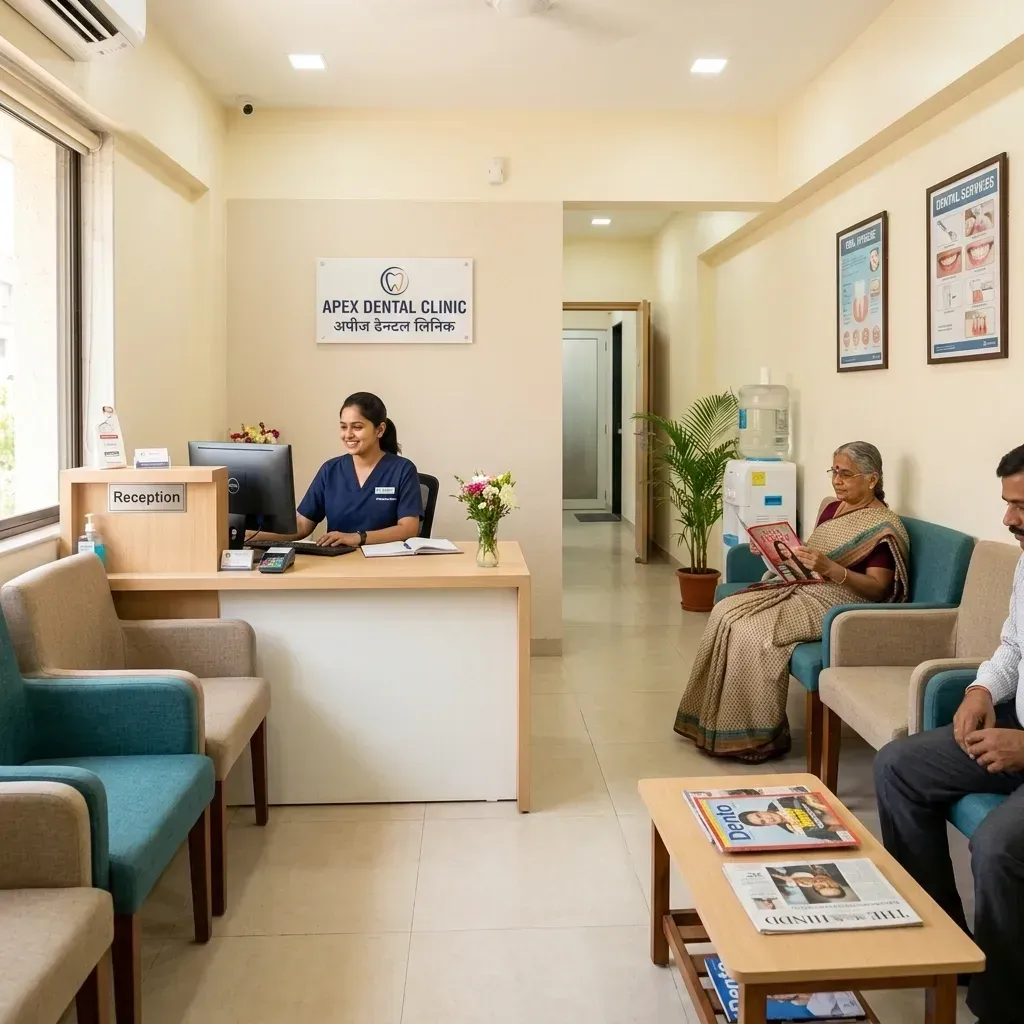
Clinic reception used in the illustrative Example Dental Clinic website
  • Consultation
  • Restorative care
  • Preventive care
Illustrative website and booking flow. Fictional clinic and patient details.

A dental website that feels like your clinic.

Choose a layout. Add your photos, services and team.

  • Six website layouts to start from
  • Editable copy, clinic photos and doctor profiles
  • Desktop, tablet and mobile previews
Website Studio
DesignCopyDoctorsServices

Layout templates

  • Modern Light

  • Clinical Pro

  • Warm Family

  • Cosmetic Dark

  • Editorial Gold

  • Multi-Specialty

Preview on every screen

Illustrative website and booking flow. Fictional clinic and patient details.

Book a visit

Example Dental Clinic

Service
Consultation
Doctor
Dr. Meera Shah

Tuesday, 10 November

  • 11:00 AM
  • 11:30 AM
  • 12:00 PM
  • 12:30 PM

Selected time

11:30 AM

Illustrative website and booking flow. Fictional clinic and patient details.

A clear path from browsing to booking.

Let patients choose from available appointment times.

  • Branch, service, doctor and time selection
  • Availability checks against the clinic schedule
  • Patient details and human verification

The booking lands in your clinic schedule.

Accepted bookings become scheduled appointments.

  • Online bookings appear in Schedule and Appointments
  • Your team manages the visit in Dentiva
  • Confirmations follow your messaging setup
Explore appointment scheduling
Online booking

Dentiva Schedule

AR

Asha Rao

Dr. Meera Shah

Tuesday, 10 November

Consultation · 11:30 AM

Scheduled

Illustrative website and booking flow. Fictional clinic and patient details.

Illustrative search preview

example-clinic.dentiva.in

Example Dental Clinic | Book a Visit

Meet our dental team in Bengaluru. Explore clinic services, opening hours and available appointment times.

Clinic location
Bengaluru
Opening hours
Mon–Sat · 9 AM–7 PM
Illustrative website and booking flow. Fictional clinic and patient details.

Give patients the details they need to visit.

Set search titles, descriptions and contact details.

  • Editable SEO title and meta description
  • Clinic location, timings, call and WhatsApp links
  • Social previews use your clinic's website content

From the first draft to your clinic's website.

Build, review and publish from Website Studio.

  1. Make it yours

    Choose a layout and add your clinic's details.

  2. Check every screen

    Preview desktop, tablet and mobile layouts.

  3. Publish when ready

    Put the reviewed draft on your clinic's address.

Edit and preview during your trial.

Publish on Growth or Full Ops.

Compare website publishing plans

Questions about your clinic website

Yes. Trial clinics can edit, save drafts and preview Website Studio. Publishing requires an eligible Growth or Full Ops subscription and publishing permission. The site uses your configured clinic subdomain, such as example-clinic.dentiva.in.

Yes. Accepted public bookings create scheduled appointments with an Online source in the clinic's Schedule and Appointments. Times are checked against availability and existing bookings. Confirmation messages depend on enabled templates, patient permissions, credits and messaging setup.

Yes. Website Studio lets authorized staff select published doctors and services, edit doctor biographies and photos, and control treatment-price visibility. Keep public credentials, service descriptions and any patient testimonials accurate and authorized.

Yes. You can pause online booking while keeping clinic information visible. The booking area then uses the configured pause message and contact options. Website availability and public booking are separate controls.

You can edit the clinic website's SEO title and meta description. The published page uses those values for search metadata and social sharing, with sensible defaults when fields are blank. Clear content and metadata support discovery, but do not guarantee indexing, rankings or patient enquiries.

Make your clinic's next first impression count.

Explore Website Studio and online booking in a demo.

Book a Free DemoStart Free Trial

What is a dental clinic website builder?

A dental clinic website builder lets you create a professional online presence with your treatments, doctors, clinic photos, and direct appointment booking.

In Dentiva, your website connects straight into your clinic schedule. When patients book online, the appointment lands on your calendar without double-booking.

What you can publish

  • Custom branded clinic website with your services and doctors
  • Mobile-optimized booking flow connected to your schedule
  • Direct appointment requests with doctor and operatory matching
  • SEO-ready pages with clinic location and opening hours
  • Included on Growth and Full Ops plans

Explore more of Dentiva

  • Appointment scheduling

    Give your front desk a shared view of the day.

    Explore feature
  • WhatsApp reminders and recalls

    Keep confirmations, reminders and recalls moving.

    Explore feature
  • Google reviews

    Make honest patient feedback part of the visit.

    Explore feature

Find the setup that fits your clinic

  • Solo practice

    One dentist, one chair.

    View clinic setup
  • Growing clinic

    Several doctors, 2–4 chairs.

    View clinic setup
  • Multi-branch

    A dental group with more than one location.

    View clinic setup
Dentiva Logo

Modern Clinical Dental Management.

Product

FeaturesPricingProduct

Solutions

Solo PracticeGrowing ClinicMulti-Branch

Resources

BlogHelp & DocsTemplates

Company

About UsContactPrivacy PolicyTerms of Service

Contact Us

support@dentiva.in
Goa, India

© 2026 Dentiva Clinical Systems.Built for Indian Dentists with ❤️

Start Free Trial